
Little Panda's Girls Town
BabyBusEducational
4.1139.00 Reviews
- Version
- 8.76.13.10
- Installs
- 10.00M
- Age Rating
- Everyone
Screenshots







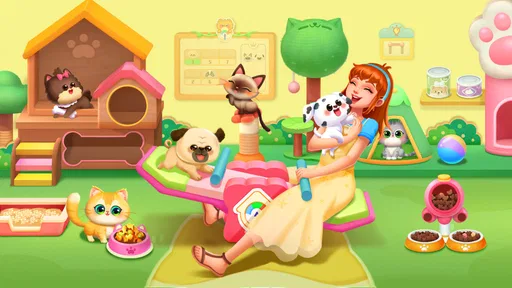
Our Review of Little Panda's Girls Town
 Analysis by Appyee
Little Panda’s Girls Town is the kind of educational game I would put in front of a young child who enjoys pretend play more than quizzes, timers, or difficult rules. It presents a town built for open-ended play, with the Little Panda world giving children room to explore and decide what to do next. I found that freedom appealing because it makes the experience feel less like a lesson and more like a digital playroom.
That freedom also explains both its charm and its limits. There is no single achievement path that keeps every child interested, and younger players may need help getting comfortable with the controls or moving between activities. I would not choose it as a replacement for a structured early-learning course. I would choose it as a gentle, low-pressure game for imaginative play, especially when a child wants to explore rather than be tested.
Getting started without turning play into a technical chore
The game is free to download, and its age classification is Everyone, so it is positioned as a family-friendly choice. It comes from BabyBus, a developer known for children’s apps, and the current version is 8.76.13.10. It runs on Android 6.0 or later, which makes it accessible on many older devices, although the actual experience will still depend on the phone or tablet’s available space, performance, and connection during installation.
In my experience, the first difficulty with a children’s game is often not the game itself. A child may tap quickly through an opening screen, miss a visual prompt, or hand the device to an adult because the next step is not obvious. I recommend doing the first launch together. Let the child hold the device, but stay close enough to explain what a button does and where to return if they wander into an unfamiliar part of the town.
A simple setup check saves frustration. Before handing over the device, I would make sure the operating system meets the minimum requirement, leave enough storage for installation and updates, and close demanding apps running in the background. If the game feels slow, the problem may be the device rather than the town itself. Restarting the phone or tablet and trying again with fewer apps open is a sensible first step.
It is also worth deciding in advance whether the child will play with mobile data, home Wi-Fi, or no connection. I would not promise a fully offline experience unless I had tested the exact activities on that device. Instead, I would install and open the game while connected, then check what remains available after briefly disconnecting. That small test tells you more than assuming every part of a large children’s game behaves the same way without a network.
Parents should also know that optional purchases are present. Individual in-app items range from $1.49 to $2.99, so I would review the device’s purchase controls before letting a child play independently. This is not a reason to reject the game, but it is an important setup step. A child focused on exploring a town may not understand that a tap can begin a real purchase process.
What can make the first session confusing
The open format is welcoming once a child understands it, but it can initially feel less clear than a game with one large “start” button and a fixed sequence. A child who expects a level, score, or obvious finish line may ask what they are supposed to do. I would answer by giving a small invitation rather than taking control: choose one place, look for something interactive, and try one action before moving on.
That approach matters because doing everything for the child removes the useful part of the game. The strongest learning opportunity here is not memorizing a correct answer. It is making a choice, observing what happens, and trying another choice. If an adult constantly directs every tap, the town becomes a demonstration instead of a space for independent play.
On the other hand, complete independence is not always realistic for a very young player. If the child cannot read interface labels, struggles with small controls, or becomes upset when an activity does not respond as expected, shared play is the better option. I would treat the game as something to explore together at first, then gradually step back once the child knows how to move around.
A practical recovery plan when something stops responding
When a child says the game is broken, I use a calm sequence rather than immediately reinstalling it. First, I check whether the tap landed on an interactive object or on decorative scenery. In an open town, not every visible item needs to respond. Next, I wait briefly, return to the previous area if possible, and try the action once more without rapidly tapping several times.
If the whole app appears frozen, I close it completely and reopen it. I then check whether the device has become hot, whether other apps are consuming memory, and whether the connection has dropped. These are ordinary checks, but they are especially useful with children because repeated tapping can make a temporary delay look like a permanent failure.
I would avoid clearing app data as an early fix. That can remove local progress or reset the child’s starting point, which creates a different kind of frustration. Reinstalling should also be a later step, not the first one. If the game works in some areas but not another, noting exactly what happened is more helpful than simply saying that it does not work.
A useful family habit is to establish a “restart and ask” rule. The child can close and reopen the game once, then ask an adult if the issue continues. This prevents a loop of random tapping and teaches a basic troubleshooting routine without making the play session feel like computer maintenance.
How the open town works as everyday play
The best use case I found is a short, guided visit rather than an endless background activity. For example, after breakfast, a child might choose one part of the town, explore several objects, and tell a parent what they discovered. The adult can ask why the child chose that place or what they want to try next. That turns a few minutes of screen time into conversation, sequencing, and imaginative storytelling.
I also like the game for transitions. A child waiting for an appointment or settling down before dinner may appreciate an experience that does not demand fast reactions. Because the design centers on an open girls’ town rather than a hard challenge, it can be easier to pause when real life calls. I would still set the stopping point before play begins, since a child absorbed in exploration may not notice time passing.
One less obvious strength is that the open structure gives children different ways to participate. A child who likes acting out stories can invent a character and a situation. Another child may prefer examining the town and repeating familiar actions. A parent can use the same session differently depending on the child’s mood, without forcing every player through identical tasks.
There is a trade-off here: the game may be more inviting for imaginative children than for children who want clear goals. Some players feel satisfied after discovering a few activities, while others need progress markers to stay engaged. If your child repeatedly asks how to win, earns rewards, or unlocks the next level, a more structured educational game may be a better fit.
I would also avoid presenting it as a serious academic tool. It can support language, choice-making, attention, and pretend play when an adult talks with the child, but those benefits come from how the game is used. The app itself should not be expected to teach reading, mathematics, or another school subject in a systematic way simply because it belongs to the educational category.
What to do when the app is not the real problem
Sometimes the apparent issue is the environment around the game. A dim screen, a cracked protector, or a tablet placed too far away can make small visual cues difficult to notice. I would improve the lighting, clean the screen, and let the child hold the device at a comfortable distance before deciding that the controls are poor.
Audio can create another misunderstanding. If the volume is low, muted, or competing with television noise, a child may miss feedback and assume an action failed. I prefer a quiet setting for the first session. Headphones can help in some families, but I would use them cautiously with young children and keep the adult close enough to communicate.
Performance problems can also come from an aging device, limited storage, or a crowded background. The game has attracted over ten million installs, but popularity does not guarantee identical behavior on every phone. I would judge the experience on the actual device the child will use, not on someone else’s newer tablet.
Connection problems deserve a similar distinction. If installation stalls, an update fails, or a screen takes unusually long to load, I would test the network with another app, move closer to the router, and retry later. If other services are also struggling, the game is probably not the source of the problem. If only this game behaves differently, recording the device model, operating-system version, and exact screen where the issue appears can make further help much more useful.
How it compares with more traditional children’s games
Compared with a puzzle app, Little Panda’s Girls Town offers less emphasis on one correct answer. Compared with a video app, it asks the child to make choices instead of only watching. Compared with a lesson-based learning game, it provides less obvious academic structure but more room for pretend play. I see it occupying the middle ground between a digital toy and a light educational activity.
That middle ground is valuable for children who become discouraged by wrong-answer sounds or timed challenges. A child can explore at their own pace and return to familiar actions. The downside is that parents looking for measurable practice may find the experience too loose. If your priority is phonics, counting drills, handwriting, or a carefully sequenced curriculum, I would choose a specialist learning app instead.
The town format also changes how adults should evaluate success. I would not ask whether the child completed enough levels. I would ask whether they stayed engaged, explained their choices, created a story, or learned to navigate without constant assistance. Those are modest outcomes, but they are realistic ones for this type of game.
Who should try it, and who should skip it
I would recommend it to families seeking a free starting point for gentle, imaginative screen play, particularly when the child enjoys colorful worlds and self-directed exploration. The Everyone rating makes it suitable for a broad family audience, while the familiar Little Panda setting may help younger players feel comfortable quickly.
I would be more cautious if your child is easily overwhelmed by open-ended choices, needs strong goals to remain interested, or tends to tap through purchase prompts without understanding them. In those cases, an adult should stay involved, and a simpler or more tightly structured alternative may be less stressful.
The same applies to households with an older device that barely meets the operating-system requirement. Meeting Android 6.0 is only the starting point; storage, memory, screen quality, and network reliability still shape the experience. I would test it before promising the game as a travel solution or handing it to a child during a long wait.
The app has earned a 4.1 average from around twenty-two thousand ratings, with more than a hundred written reviews visible alongside them. I read that as evidence of broad interest rather than a guarantee that every child will enjoy the same style of play. The install figure, above ten million, shows that the format has reached a large audience, but personal fit matters more than popularity for a young player.
My practical verdict
After using it as a child-focused play space, I see Little Panda’s Girls Town as a pleasant option when the goal is exploration, not academic measurement. BabyBus keeps the premise approachable, and the free entry point makes it easy to test without committing to a paid game. The open format can encourage conversation and imagination, especially when a parent joins for the first few sessions.
My main reservation is the same feature that makes it distinctive: freedom can feel vague. Some children will happily invent their own activities, while others will wonder what comes next. Optional purchases also mean that a quick parental control check belongs in the setup routine, not after an accidental tap.
If I were recommending it to a friend, I would say to install it on a suitable device, launch it together, and begin with a short visit to one area of the town. Watch whether the child enjoys choosing what to do without being pushed toward a score. If they do, the game can become a useful little space for imaginative breaks. If they need clear lessons, measurable progress, or more demanding challenges, I would look elsewhere rather than expecting this open town to become something it was not designed to be.
Verdict
Strengths of Little Panda's Girls Town
- Bright, child-friendly visuals make the town easy and enjoyable to explore.
- Simple touch controls are suitable for younger children.
- Different locations encourage imaginative role-play and discovery.
- Short activities work well for quick, casual play sessions.
- Friendly characters help create a welcoming, non-competitive experience.
Limitations of Little Panda's Girls Town
- Some activities may feel repetitive after extended play.
- The large number of in-game prompts can distract younger players.
- Certain areas or features may require additional downloads.
- Limited challenge may not appeal to older children.
- Parental supervision is recommended for ads or optional purchases.
Other Releases by BabyBus
View All
Little Panda Policeman
Educational4.0

Little Panda's Chinese Recipes
Educational4.4

Little Panda's Restaurant
Educational4.4

Little Panda's Ice Cream Games
Educational4.3
Similar Picks in This Category
View AllLittle Panda Policeman
BabyBus4.0

Monster Trucks Game for Kids 2
Raz Games4.1
Little Panda's Chinese Recipes
BabyBus4.4
Little Panda's Restaurant
BabyBus4.4
Little Panda's Ice Cream Games
BabyBus4.3

Baby Panda Care
BabyBus3.8
Frequently Asked Questions
What is Little Panda's Girls Town?
Little Panda's Girls Town is a child-friendly role-playing and exploration game centered on everyday activities, creativity, and imaginative play. Players can visit different locations, interact with characters, choose outfits, and complete simple tasks. Its colorful presentation and accessible controls are designed mainly for young children, especially preschool and early elementary-age players.
Is Little Panda's Girls Town suitable for children?
The game is generally designed for children and uses bright visuals, simple objectives, and non-violent gameplay. However, parents should still review the recommended age rating and available settings before allowing children to play. Younger players may need help understanding menus, while supervision is advisable if the app includes advertisements, external links, or optional purchases.
Does Little Panda's Girls Town require an internet connection?
Some parts of Little Panda's Girls Town may work offline after installation, which is convenient for travel or situations without reliable Wi-Fi. Nevertheless, an internet connection can be required for downloading additional content, displaying advertisements, restoring purchases, or receiving updates. Availability may vary by device and version, so test the game offline before relying on it.
Are there in-app purchases or advertisements in the game?
Little Panda's Girls Town may include advertising or optional in-app purchases, depending on the platform, region, and current version. These can unlock extra outfits, locations, activities, or other content. Parents should check the store listing and configure device-level purchase restrictions before handing the device to a child, particularly when payment information is already saved.
What can players do in Little Panda's Girls Town?
The game focuses on open-ended activities rather than difficult competition. Players can explore town areas, interact with friendly characters, dress up avatars, decorate or customize spaces, and take part in playful daily-life scenarios. The experience encourages creativity and discovery, although the amount of available content and the freedom to explore may depend on unlocked features.
Play our best games!


